Transport manager software should reduce the time spent finding information, chasing actions and rebuilding an evidence trail. It should not create another disconnected system that has to be checked alongside spreadsheets, calendars, inboxes and paper files.
The right product depends on the work you need to control. A general fleet system may be strong on costs, fuel and telematics. A transport management system may focus on planning and dispatch. Software built for a UK transport manager should bring operator licence responsibilities, vehicle roadworthiness, driver oversight and management evidence into the daily workflow.
ETM Desk is transport manager software built around that complete workflow, with a free plan for members who want to start organising their work before choosing a paid plan.
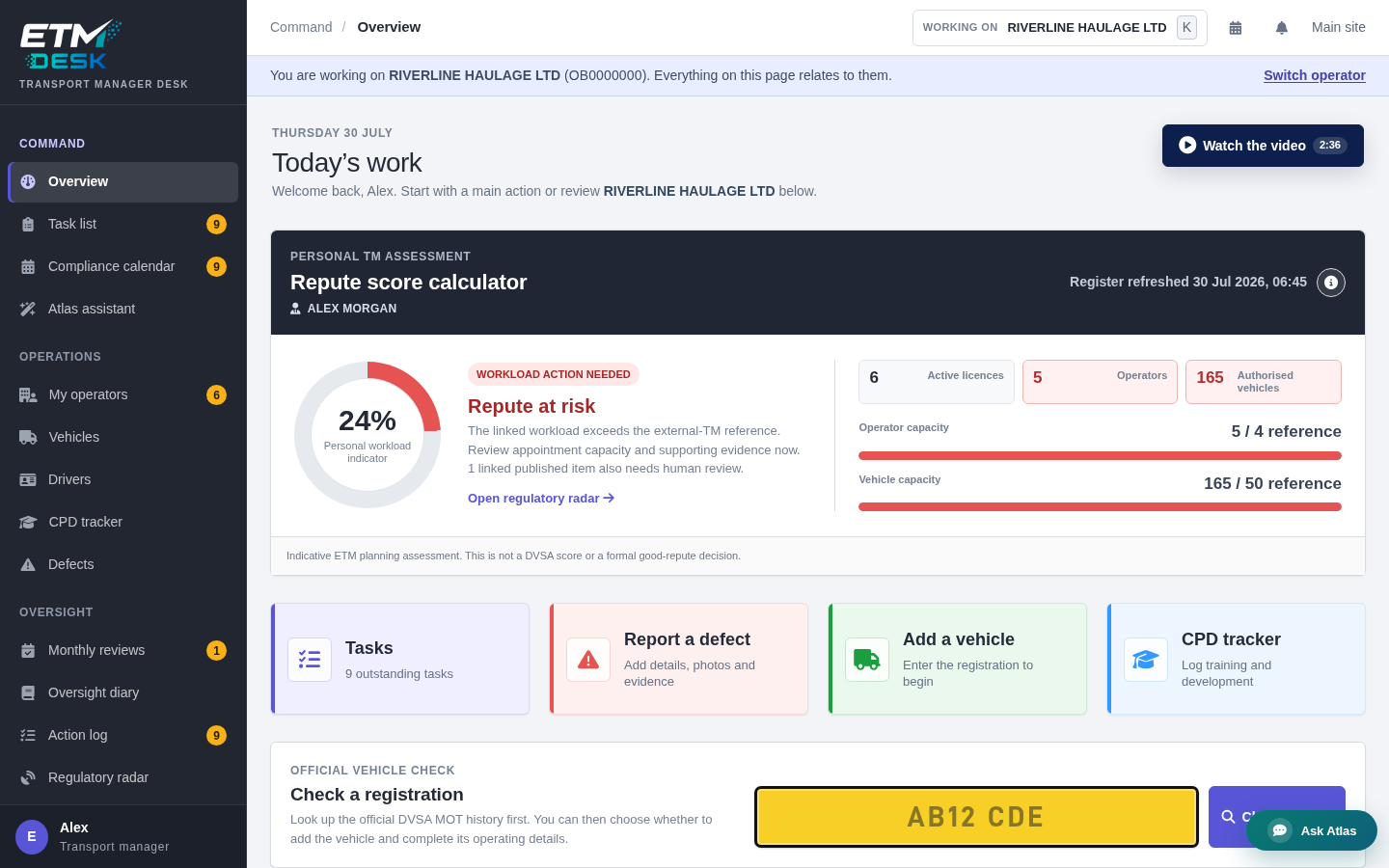
What transport manager software should help you control
A useful system starts with the records and decisions that a transport manager actually needs. That normally includes the operators you are responsible for, the vehicles and drivers within scope, safety inspection dates, defects, licence checks, documents, reviews and the actions raised when something is missing.
The software should help answer practical questions without a long search:
- What is overdue today?
- What becomes due in the next 30 days?
- Which defect is still awaiting rectification?
- Which vehicle has no inspection date or evidence recorded?
- Which driver check, CPC record or document needs attention?
- What action was agreed, who owns it and when was it closed?
- Can the underlying evidence be produced if the operator is audited?
These are not isolated modules. A recorded defect may create an action, affect vehicle availability and require rectification evidence. A monthly review may identify work for the operator. A changed inspection date should update the calendar. Good transport manager software keeps those records connected.
Seven features to assess before you buy
1. A useful daily overview
The first screen should show what needs attention rather than a collection of decorative charts. Look for overdue items, approaching dates, open defects and outstanding tasks, with a direct route into the underlying record.
2. A task system linked to compliance records
A generic task app can record a reminder, but it does not understand why the task exists. Software designed for transport managers should link actions to an operator, vehicle, driver, defect, review or document. It should keep the history when priority, owner or status changes.
3. A compliance calendar that updates with the data
Calendar entries should not depend entirely on manual duplication. If an MOT date, safety inspection interval or document expiry changes, the schedule should follow the source record. An export or private calendar feed is useful when you also work in Apple Calendar, Google Calendar or Outlook.
4. Vehicle and defect workflows
The DVSA Guide to Maintaining Roadworthiness recognises that electronic vehicle maintenance systems can manage safety inspections, maintenance scheduling and driver defect reporting, provided the essential information can be made available for examination. Check that the software can retain the report, decision, evidence and rectification trail rather than recording only an open or closed label.
5. Driver oversight
Driver records should make the check cycle, CPC position, disclosures, training and follow-up actions visible. The current DVSA drivers’ hours and tachographs guidance includes operator responsibilities for compliance, so a system should support active monitoring rather than serve only as a document store.
6. Reviews, documents and audit evidence
Look for structured monthly reviews, a document store, an action log and reports that can be read without specialist access. The value is not the number of files held; it is the connection between a finding, the action taken and the evidence that the action was completed.
7. Assistance that keeps the transport manager in control
AI can help summarise records, draft a policy, prepare an operator update or suggest a task. It should be grounded in the records you are viewing and should never make an unreviewed compliance decision. Atlas in ETM Desk proposes work for the transport manager to check and confirm; it does not replace professional judgement.
External transport managers need a portfolio view
An external transport manager may be moving between several operators, each with different fleets, inspection intervals, providers and risk areas. Software should allow a portfolio-wide view and a clearly scoped operator view. It must be obvious which operator a task, document or conversation relates to.
Workload also needs context. ETM’s custom Repute Score combines the official register information held by the platform with recorded workload and evidence signals to provide an indicative personal planning view. It is not an OCRS score, a DVSA assessment or a Traffic Commissioner decision. Its purpose is to explain where workload or evidence may need attention.
How ETM connects finding work with managing it
Most compliance products begin after a client has already been won. ETM starts earlier. A transport manager can build and claim a public profile, receive matched opportunities, discuss work through the platform and then move the operator into the Desk when the engagement begins.
That creates one journey:
- Build a profile that operators can find.
- Receive and assess suitable transport manager leads.
- Win the work and agree the scope.
- Set up the operator, vehicles, drivers and key dates.
- Manage tasks, defects, reviews and evidence.
- Prepare reports and maintain an audit trail.
The directory and the working software are parts of the same ETM platform, so winning work and maintaining it do not have to live in separate accounts.
Questions to ask during a software trial
- Can I see all urgent work without opening every operator?
- Can every action be traced to a record and a completion history?
- Does a date change update reminders automatically?
- Can I export or present the evidence without vendor support?
- Are records separated correctly between operators?
- Does the system explain any score or warning it produces?
- Can I start small and add operators, vehicles or documents without rebuilding the account?
- Are AI suggestions reviewed by a human before they change records?
A trial should use a realistic operator workflow. Add a vehicle, record an inspection date, report a defect, raise a task and close it with evidence. That reveals more than a feature list.
Start with the work that causes the most friction
You do not need to migrate every old file on day one. Begin with active operators, live vehicles, open defects and the next important dates. Add the recurring review process, then bring historic evidence across where it has a clear retention or audit purpose.
Explore the complete ETM Desk workflow or compare the ETM Desk plans.
Related guides
- Fleet management software vs transport manager compliance software
- TMS software vs transport compliance software
- Building an operator licence compliance evidence trail
This article provides general information for transport professionals. It is not legal advice and does not replace the current undertakings on an operator’s licence, official guidance or professional judgement.
Request quotes from UK transport managers and consultants
Send one request through ETM and invite suitable listed providers to respond. Any quotes received are shown in your ETM dashboard and sent by email; responses depend on provider availability. Providers can help with operator licence compliance, DVSA audit preparation, drivers’ hours, maintenance systems and more.