TMS software is an ambiguous search term. In logistics, TMS usually means a transport management system used to quote, plan, dispatch and track freight. For a transport manager, the same initials can be read as transport manager software. Those products solve related but different problems.
Before comparing suppliers, define whether the main need is moving consignments, managing fleet operations or controlling operator licence compliance. A polished dispatch screen will not necessarily manage safety inspection evidence, and a compliance system will not necessarily optimise routes or calculate freight charges.
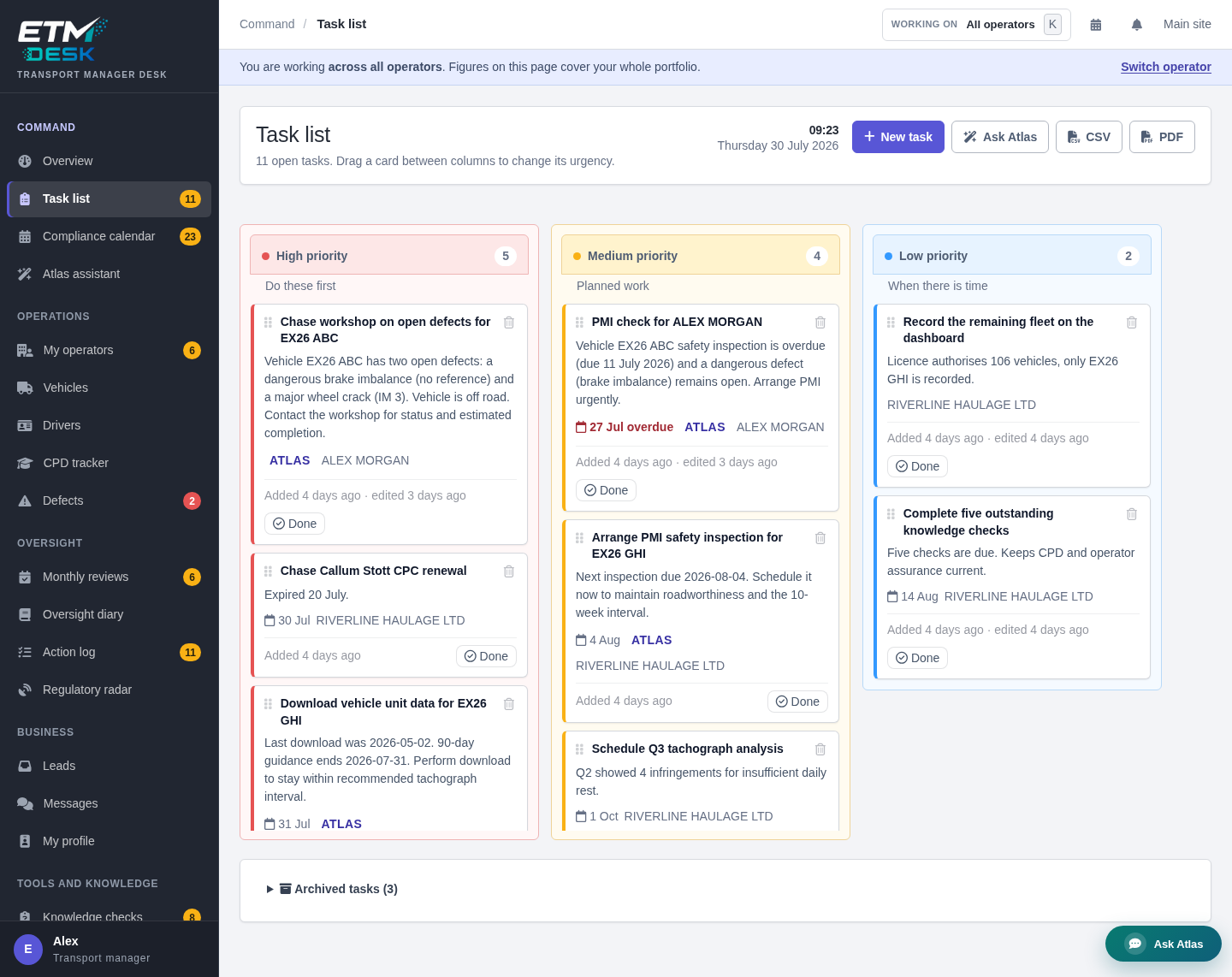
ETM Desk is transport manager and compliance software. It supports the person responsible for operators, vehicles, drivers, defects, tasks, reviews and evidence rather than replacing a haulage planning system.
What a transport management system normally does
A conventional logistics TMS manages the commercial and operational journey of a load. Common functions include:
- quotations and rate management;
- order entry and job planning;
- vehicle and driver allocation;
- route planning and scheduling;
- subcontractor management;
- proof of delivery;
- customer tracking and notifications;
- invoicing and job profitability;
- connections to telematics, warehouse or accounting systems.
This is sometimes described as haulage management software, freight management software or dispatch software. Its core object is usually a job, load or consignment.
What transport compliance software normally does
Compliance software starts from a different object: the operator, licence, vehicle, driver, obligation, record or action. It helps the transport manager see whether systems are controlled and whether the decisions and follow-up can be shown.
Typical functions include:
- operator and licence records;
- vehicle details, MOT dates and safety inspection planning;
- driver records, licence checks and CPC dates;
- defect reporting, vehicle-off-road decisions and rectification;
- tasks, owners, due dates and closure history;
- monthly compliance reviews;
- documents and evidence;
- oversight diaries and action logs;
- compliance calendars and reminders;
- reports and audit packs.
The same event appears differently in each system
Consider a vehicle allocated to a delivery tomorrow when a driver reports a serious defect.
In the logistics TMS, the immediate questions are operational: must the load be moved to another vehicle, will the route be late, does the customer need an update and will the job margin change?
In the compliance system, the questions concern control and evidence: what was reported, how was severity assessed, was the vehicle taken out of service, who authorised rectification, what evidence supports the repair and when was the vehicle returned to service?
Both views matter. The products can exchange data, but they should not blur ownership of the decision.
Where task management fits
A task board is useful only when it reflects the underlying records. A card called “book PMI” should identify the vehicle, operator, due date and reason. A task to chase rectification should remain connected to the defect. A monthly review action should be visible in both the review and the general work queue.
ETM Desk keeps the task board and action log as two views of the same work. Atlas can propose a task or reminder based on the operator records being viewed, but the transport manager reviews the proposal before it changes anything.
Why evidence matters
The current DVSA earned recognition HGV audit standards are designed for that scheme, but they are a useful illustration of evidence-led control. They refer to documented processes, controls, representative records, monitoring and subsequent action. Buying software is not proof that a system is effective; the records and management response remain central.
The Guide to Maintaining Roadworthiness likewise explains that an electronic maintenance system can manage required information, while effective supervision and management are still necessary.
Do you need one system or two?
One platform may be enough when:
- the fleet and job operation is small;
- the chosen product genuinely covers both workflows;
- the evidence trail is complete and exportable;
- users can see clear boundaries between commercial and compliance decisions.
Separate connected products may be better when:
- dispatch planning is complex or high volume;
- specialist optimisation, rates or customer integrations are required;
- an external transport manager works across operators using different TMS products;
- compliance access must be separated from commercial job data;
- each team needs a focused workflow.
For external transport managers, a dedicated Desk can be especially useful because the portfolio should not depend on every client buying the same dispatch system.
A practical requirements checklist
Write the ten decisions or records that currently cause the most delay. Then classify each one:
- Commercial: quote, order, rate, invoice or customer communication.
- Operational: planning, allocation, route, tracking or proof of delivery.
- Asset: workshop, cost, service, tyre or parts information.
- Compliance: obligation, check, defect, review, action or evidence.
This prevents the buying process being led by a generic feature count. A system can have hundreds of functions and still miss the workflow that matters.
How ETM supports the full transport manager journey
ETM combines a marketplace and professional profile platform with the Desk. A transport manager can be found by an operator, receive matched leads and manage conversations. Once work is agreed, the Desk provides the operator-specific working environment.
From there the transport manager can organise vehicles and drivers, record defects, plan dates, run monthly reviews, maintain an oversight trail and prepare reports. Atlas assists with record-grounded questions and drafts, while the transport manager stays in control.
The custom Repute Score provides an indicative view of personal workload and evidence signals. It is designed for planning and explanation, not as an official score or a substitute for a regulator’s judgement.
How to test TMS software properly
- Use one realistic job or operator rather than sample dashboards.
- Enter a change that should affect another record.
- Raise a defect or exception and follow it to closure.
- Ask another user to find the decision and supporting evidence.
- Export the information in a readable form.
- Check access boundaries between operators and roles.
- Ask how data can be retrieved if you leave the supplier.
To test the compliance side, open the ETM Desk product overview. You can also compare ETM Desk plans and start with Desk Free.
Related guides
- Transport manager software buyer’s guide
- Fleet management software vs compliance software
- Operator licence compliance software and evidence
This article is general guidance and not legal advice. Confirm the requirements that apply to the operator, vehicles and work using current official guidance and competent professional judgement.
Request quotes from UK transport managers and consultants
Send one request through ETM and invite suitable listed providers to respond. Any quotes received are shown in your ETM dashboard and sent by email; responses depend on provider availability. Providers can help with operator licence compliance, DVSA audit preparation, drivers’ hours, maintenance systems and more.