Fleet maintenance software should do more than list service dates. For an operator and transport manager, the important workflow runs from planning through inspection, defect handling, rectification, review and retained evidence.
A spreadsheet can calculate a next date. The harder part is keeping the planned interval, actual inspection, reported defects, vehicle status, repair evidence and management follow-up connected when several people and providers are involved.
PMI, safety inspection and service are not the same record
PMI is widely used in industry to mean a periodic maintenance inspection, but the official guidance refers to regular safety inspections. A safety inspection is designed to assess roadworthiness at the planned interval. Routine servicing may be carried out at the same visit, but it has a different purpose.
The DVSA Guide to Maintaining Roadworthiness explains the scope of safety inspections, intervals, reports, electronic capture and management review. Software should preserve that distinction instead of treating every workshop event as a generic service.
What the maintenance planner needs
At minimum, the planner should make these items visible:
- vehicle and trailer identity;
- operator and operating scope;
- declared or adopted safety inspection frequency;
- last completed inspection date;
- next due date;
- MOT and other relevant test dates;
- first-use or intermediate checks where applicable;
- maintenance provider and booking status;
- open defects or vehicle-off-road status;
- missing reports or evidence.
The next date should be derived from a confirmed source record. If the last inspection date or interval changes, the calendar and work queue should follow it.
Choosing and reviewing inspection intervals
An inspection interval should reflect vehicle type, age, use, mileage, operating conditions and the effectiveness shown by the records. The Guide to Maintaining Roadworthiness gives a normal range and examples, but the correct interval depends on the operation and the commitments made.
Software can calculate a proposed next date and reveal overdue work. The transport manager still needs to review whether the interval remains effective. Repeated defects, demanding work or changes in use may justify a different approach and appropriate updates to the operator’s arrangements.
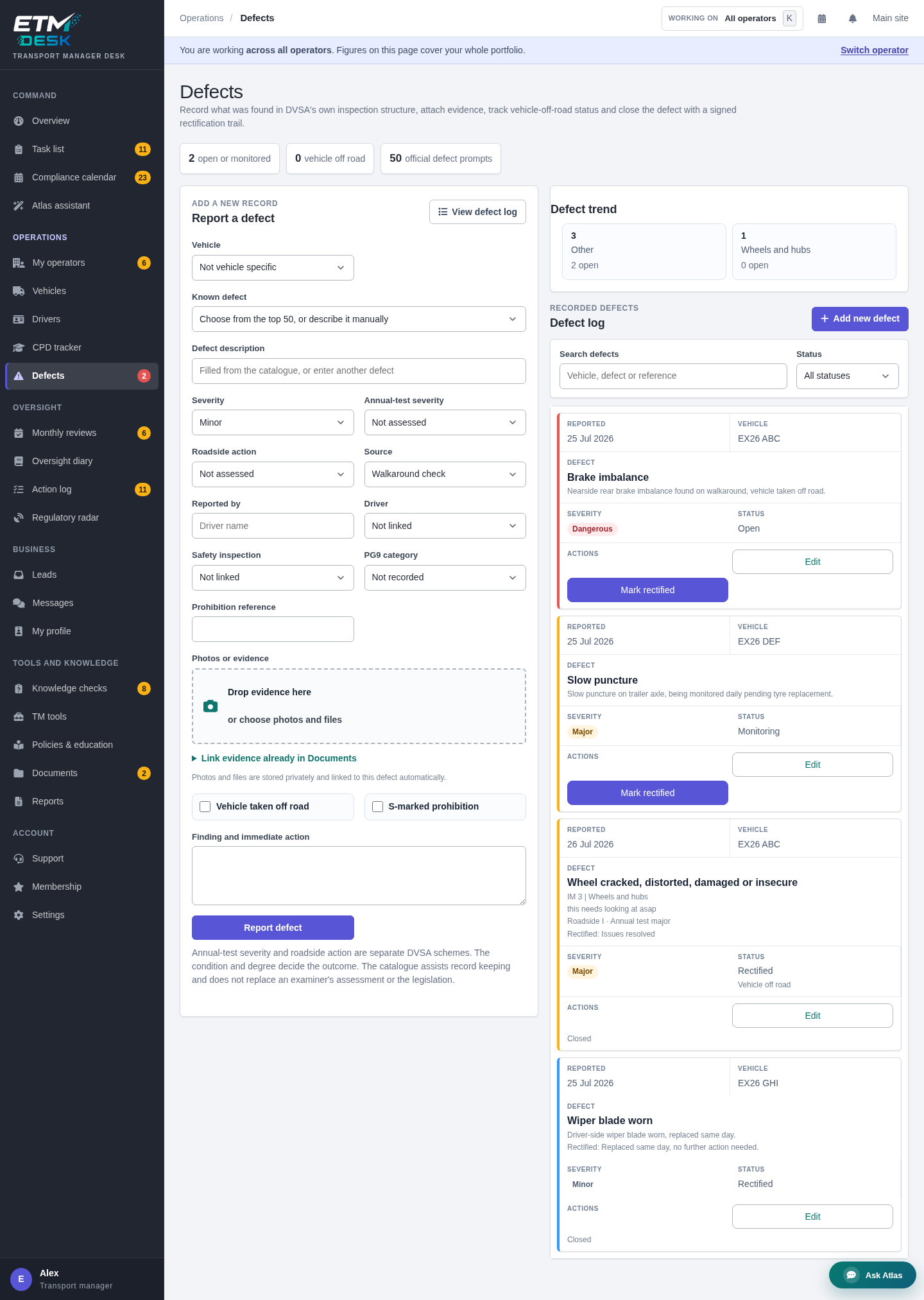
The defect workflow from report to closure
1. Record the finding
Capture the vehicle, date, source, description and reporter. Attach photographs or documents where they help. A catalogue can improve consistency, but the record must still describe what was actually found.
2. Assess severity and immediate action
Record the competent decision, including whether the vehicle is taken out of service or further assessment is required. Avoid software that closes the issue merely because it was sent to a workshop.
3. Assign and monitor rectification
The responsible person, provider and expected date should be visible. Overdue rectification must return to the active work queue rather than disappear inside a maintenance job.
4. Retain repair evidence
Keep the invoice, job sheet, photograph, inspection result or other evidence that supports the repair. The evidence should remain linked to the original defect.
5. Confirm return to service
Where a vehicle has been taken out of service, the record should show who was authorised to reinstate it and on what evidence. A repaired label without that decision is weak.
6. Review for patterns
Repeated faults, poor first-time repair, driver reporting gaps or late inspections may indicate a system issue. Trend views are useful only when the underlying records are complete and comparable.
Driver defect reporting and workshop records must meet
Driver reports often begin outside the transport manager’s desk, while rectification evidence may arrive from a contractor later. A strong process creates a single chain rather than two separate folders.
The driver needs a clear method to report a fault and authority to escalate serious concerns. The workshop needs enough information to inspect and rectify. The transport manager needs visibility of status, evidence and any recurring issue. Software can coordinate those handovers without removing the need for competent assessment.
Electronic records: what makes them usable
The DVSA guide accepts electronic records where they contain the essential information and can be made available for examination. In practice, test these points:
- Can the full report be read and exported?
- Are changes time-stamped?
- Can photographs and rectification documents be retrieved?
- Does the record identify who reported, reviewed and closed the issue?
- Can the vehicle’s history be followed in date order?
- Are retention and backups understood?
- Can access be limited without blocking legitimate review?
Maintenance software and the transport manager’s task board
A missing report, overdue inspection or open dangerous defect should create visible work. ETM Desk connects these items to tasks and the compliance calendar. The same action appears in the work queue and action history, reducing the risk of contradictory lists.
Atlas can summarise urgent records and propose a follow-up task or reminder. The proposal is reviewed by the transport manager before it is added.
What to include in the monthly maintenance review
- inspections completed on time;
- late, missing or incomplete reports;
- driver defects and rectification times;
- vehicles taken out of service and reinstatement evidence;
- annual test results and advisories;
- brake performance evidence;
- repeat defects and first-time repair quality;
- maintenance provider performance;
- changes in vehicle use, age or condition;
- previous actions and whether they were effective.
The review should create specific actions when needed and retain the conclusion when no action is required.
Fleet maintenance software buying questions
- Show the complete defect trail, not only the current status.
- Change a safety inspection date and show the calendar update.
- Show how a vehicle-off-road decision is recorded and cleared.
- Find all open defects across several operators or depots.
- Export one vehicle’s inspection and defect history.
- Show who changed a record and when.
- Explain backups, retention and data retrieval.
- Show how workshop records and transport manager actions connect.
How ETM fits the wider operation
ETM Desk focuses on the transport manager’s compliance control. It is not a workshop parts or telematics replacement. It can sit alongside those systems while providing the operator, vehicle, driver, task, review and evidence context the transport manager needs.
The wider ETM platform also helps transport managers build a profile, receive matched opportunities and win work. Once an operator is engaged, that relationship can move into the Desk for ongoing management.
Explore ETM Desk’s vehicle and defect workflow or compare Desk plans.
Related guides
- Fleet management software vs compliance software
- Operator licence compliance and evidence trails
- Transport manager software buyer’s guide
This article provides general information, not legal advice. Apply current official guidance, the operator’s licence and undertakings, and competent judgement to the specific fleet and operation.
Request quotes from UK transport managers and consultants
Send one request through ETM and invite suitable listed providers to respond. Any quotes received are shown in your ETM dashboard and sent by email; responses depend on provider availability. Providers can help with operator licence compliance, DVSA audit preparation, drivers’ hours, maintenance systems and more.