Transport Manager check
- Confirm the symbol or message against the unit fitted to the vehicle.
- Check the activity record against the driver’s actual work and journey.
- Preserve the driver card, vehicle-unit download, printout and explanation where relevant.
- Record the corrective action and check later records to see whether it worked.
Tachograph symbols are a starting point for identifying an activity, mode, item of equipment or recorded event. They are not, by themselves, a diagnosis of why a record is wrong or proof that an infringement has occurred.
A Transport Manager should first identify the exact unit, driver, vehicle, date and time. The next step is to compare the display, printout or download with the driver’s account and the work actually carried out.
The four activity records that matter most
| Activity | What the official guidance says | Transport Manager check |
|---|---|---|
| Driving | Most tachographs record driving automatically. | Check vehicle movement against the card and vehicle-unit data. Investigate driving recorded without a card or a mismatch between the driver and vehicle record. |
| Other work | Work other than in-scope driving, including work for the same or another employer inside or outside transport. | Compare the mode with duties such as loading, vehicle checks, cleaning, administration or other employment. Do not treat active work as availability. |
| Availability | Waiting time whose duration is known in advance. It is not a break or rest period. | Check what the driver was waiting for, when the likely duration became known and whether the driver was required to work. |
| Break or rest | No driving or other work may be carried out. A break is used exclusively for recuperation and a driver must be free to dispose of their time during rest. | Test whether the surrounding duties and instructions are consistent with a genuine break or rest. Annual and sick leave also need to be recorded. |
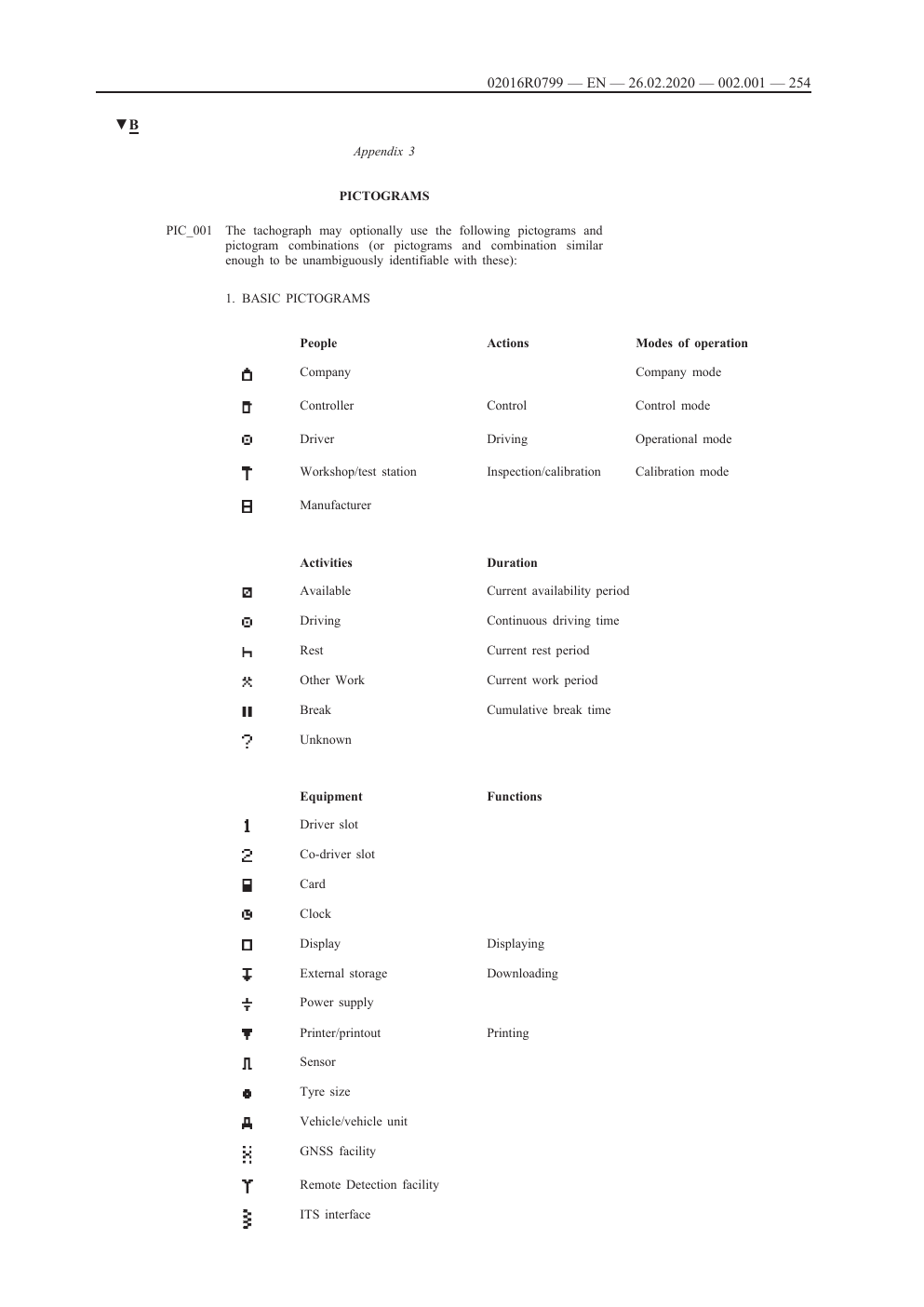
Why the mode shown may not match the work
Digital and smart tachographs can be configured to default to rest or to other work and availability when a vehicle stops. The default depends on the preferences entered at calibration. A driver must still use the mode button correctly throughout the working period.
Do not close a review simply because the displayed symbol is familiar. Establish whether the driver selected the mode, whether the unit changed mode automatically, what task was being carried out and whether the record needs correction.
What to do when an activity was recorded incorrectly
GOV.UK guidance says that where a digital or smart tachograph does not make an accurate activity record, the driver should make and sign a printout for the relevant period, noting the error and reason at the time it is made. Manual records must be retained and produced in the same way as other tachograph records.
For the operator file, link the correction to the original record. Record who reviewed it, the evidence used, whether an infringement or systems issue remains and what follow-up is required.
Events, faults and manufacturer-specific displays
Appendix 3 contains prescribed pictograms and combinations that a tachograph may use. A particular unit can present messages, menu wording and combinations differently. An unfamiliar warning should therefore be checked against the approved instructions for the make, model and software version fitted.
This library does not reproduce manufacturer icons without confirmed permission. Where a manufacturer-specific display is involved, the guide will link to the relevant official manual or describe the verification process without copying protected artwork.
Evidence to retain during a review
- driver card download and relevant vehicle-unit download
- dated printout with the driver’s note and signature where a correction is required
- vehicle registration, tachograph make and model, calibration details and software version where available
- driver statement, work schedule, route and other records needed to establish the activity
- analysis result, decision, action owner and review date
Operator download and analysis controls
Current GOV.UK guidance states that operators must download vehicle-unit data every 90 days and driver-card data every 28 days, then analyse the information to check compliance. Shorter internal intervals may be appropriate where the operator needs earlier visibility of risk.
A one-off correction should not end the review if later downloads show the same pattern. Test whether driver briefing, calibration settings, scheduling, supervision or the operator’s infringement process needs to change.